
Planning a new fence for your farm or property starts with one important step: knowing how much fencing you actually need. Whether you’re enclosing a pasture, adding a new paddock, fencing a garden, or securing the perimeter of your property, getting an accurate measurement helps you budget properly, choose materials, and streamline the entire project.
The good news? You don’t have to walk your entire property with a tape measure. With Google Maps, you can measure your fence line quickly, easily, and for free—right from your computer or smartphone.
In this guide, we’ll walk you through how to use Google Maps to measure your fence line, offer accuracy tips, and show how your measurements help ProFence deliver faster, more precise quotes.
Why Measure Your Fence Line Before Getting an Estimate?
Before you contact a fencing company, having an estimated measurement gives you a major advantage. Here’s why property owners rely on Google Maps before starting a project:
✔ More Accurate Budgeting
Knowing the approximate linear footage helps you understand the scope and cost before the installation starts.
✔ Faster Quotes from ProFence
Sharing your Google Maps measurement speeds up the quoting process and allows us to provide a more precise estimate.
✔ Smarter Material Planning
The more accurate your footage, the better we can recommend the right fence type—whether it’s high-tensile, woven wire, deer fencing, board fencing, or electric.
✔ Fewer Surprises Later
Measuring ahead of time helps us identify potential challenges, like long fence lines, terrain changes, or areas requiring clearing.
Whether you’re fencing 2 acres or 200, a few minutes on Google Maps can save you hours later.
What You Need Before You Start
You don’t need any special software—just a simple checklist:
- A computer, tablet, or smartphone
- Internet access
- Your property address or GPS location
- A general idea of where your fence will be placed
Once you’re ready, it’s time to start measuring.
How to Use Google Maps to Measure Your Fence Line (Step-by-Step)
Google Maps has a built-in tool called Measure distance that lets you trace fence lines directly on the map. Here’s how to use it:
Step 1: Open Google Maps & Find Your Property
- Go to maps.google.com.
- Type your address into the search bar.
- Switch to Satellite View using the bottom-left toggle.
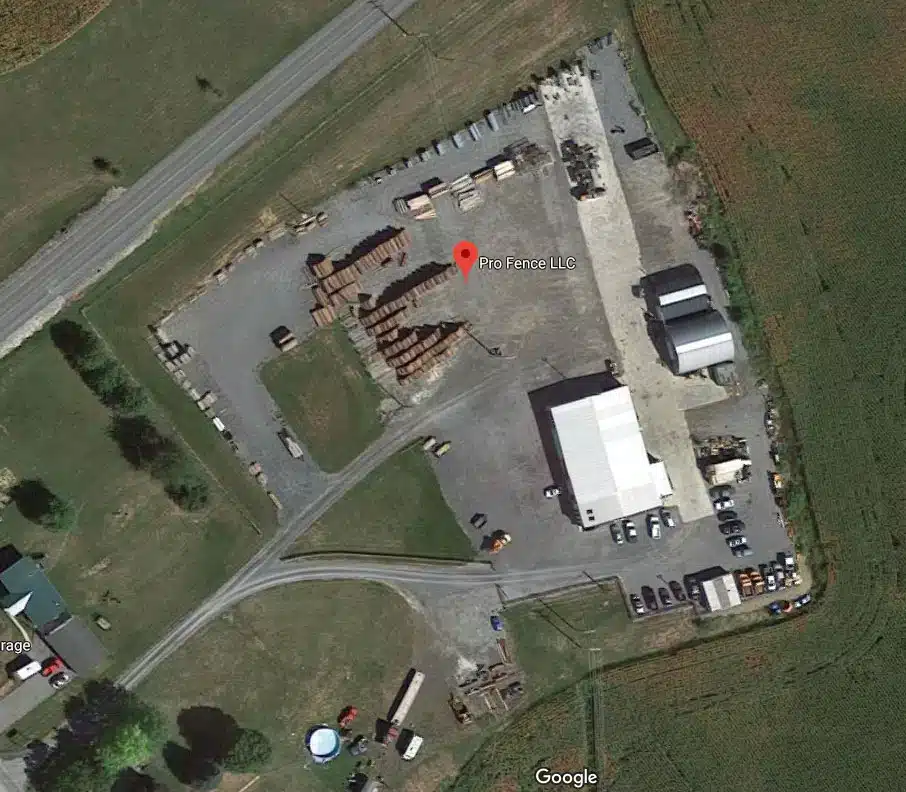
Satellite View gives you a clear aerial photo of your land, making it easier to see fence lines, tree lines, and property edges.
Step 2: Zoom In on the Area You Want to Fence
Zoom in until you can clearly see the boundaries or the area where you plan to install your fence. The closer you zoom, the more accurate your measurement will be.
Step 3: Activate the “Measure Distance” Tool
Google Maps makes this simple:
On Desktop:
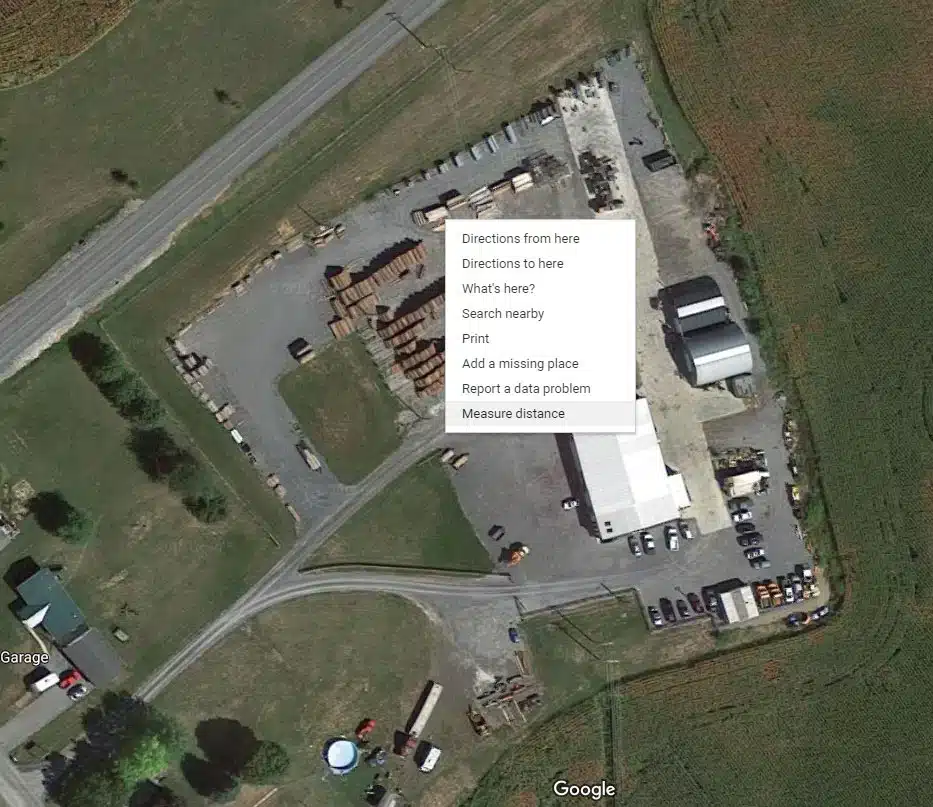
- Right-click anywhere on the map
- Select “Measure distance”
On Mobile:
- Tap and hold on the map
- Swipe up on the pin
- Choose “Measure distance”
A small white circle (your first measurement point) will appear.
Step 4: Begin Plotting Your Fence Line
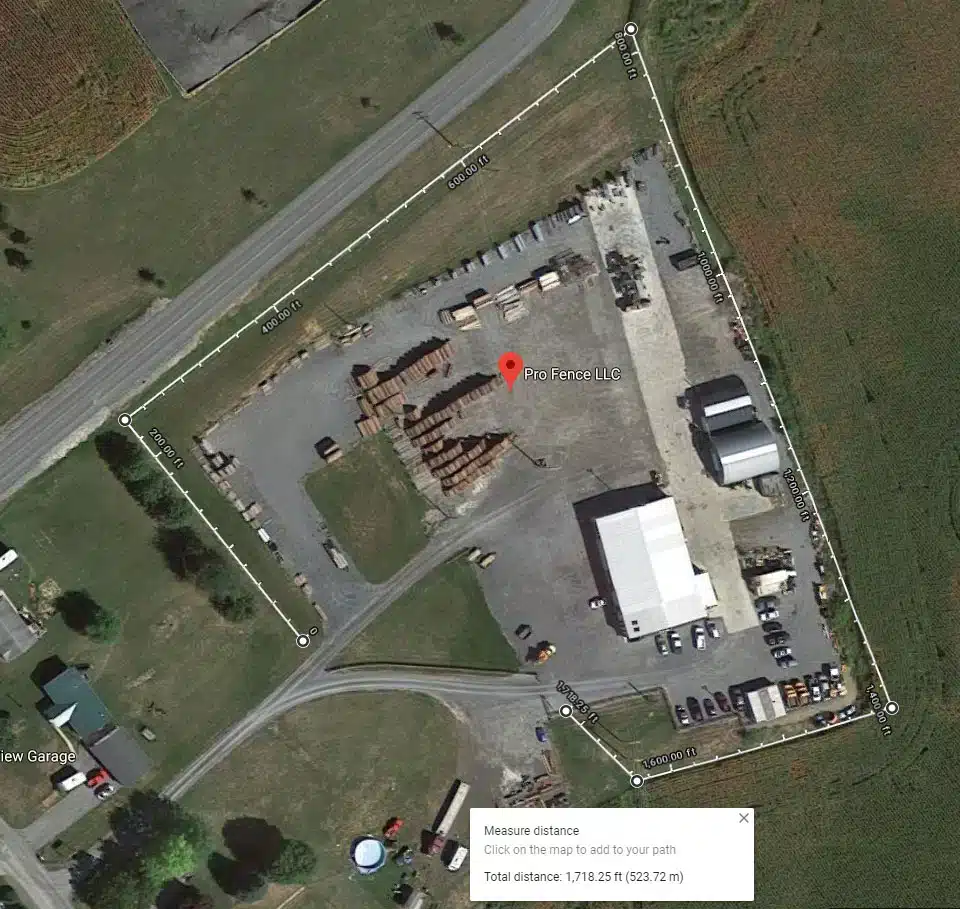
Click (or tap) along the line where your fence will run.
- Click once to add each new point
- Trace along the field edge, treeline, or property boundary
- Add points anywhere the fence changes direction
Pro Tip: Add points frequently, especially around curves or uneven terrain. The more points, the more accurate your measurement.
Step 5: Review Total Distance
As you place points, Google Maps automatically calculates distance.
You’ll see the total linear footage displayed in the bottom window. You can toggle between:
- Feet
- Meters
- Kilometers
- Miles
For fencing, feet is the most useful.
Step 6: Save or Screenshot Your Measurement
Once finished:
- Take a screenshot
- Save the measurement using your device’s options
- Email or text it with your quote request
This makes it easy for ProFence to review your layout and begin estimating material and labor needs.
Tips for Getting the Most Accurate Measurement
Want the most precise fence measurement possible? Follow these pro tips:
Zoom in—way in
Satellite images can be deceiving at a distance. The closer you zoom, the more accurate your points will be.
Follow the terrain, not straight lines
If your land curves or slopes, place multiple points to mimic the true path of the fence.
Don’t measure through trees or buildings
Instead, trace around obstacles the same way an actual fence would.
Account for gates and bracing
Fence corners and gate openings require extra footage. Add:
- +10 ft for each corner
- +12–16 ft for gates (depending on size)
Cross-check with property boundary maps
County GIS maps or parcel data help confirm boundaries accuracy.
Measure each section separately
For pastures, paddocks, or multi-zone fence lines, measure each piece individually to avoid confusion.
How Google Maps Measurements Help ProFence Provide Better Quotes
Once you send us your Google Maps screenshot and footage, the ProFence team can:
✔ Prepare a faster, more accurate estimate
We can calculate materials—wire, posts, braces, gates—more precisely.
✔ Recommend the best fence type
Different footage lengths are better suited to certain materials.
✔ Identify prep work needed
Land clearing, grading, or brush removal becomes clear from the aerial view.
✔ Plan equipment access
We use your map to determine where to bring machinery onto the property.
✔ Speed up the timeline
Your project gets into our schedule faster because we already understand the scope.
With your Google Maps measurement, we walk onto your property prepared—not guessing.
When You Still Need an On-Site Evaluation
While Google Maps is the perfect starting point, there are reasons to schedule a professional site visit:
- Steep slopes or rocky ground
- Areas with heavy tree cover
- Large projects (multiple acres or long perimeters)
- Properties with complicated layouts
- Projects that require land clearing
- Fencing near waterways or wetlands
Our team will verify your Google Maps measurement, confirm boundaries, and review terrain before installation begins. This ensures your fence is placed correctly and built to last.
Google Maps Makes Fence Planning Simple
Yes — you can absolutely use Google Maps to measure your fence line, and the process is easy, accurate, and incredibly helpful. With just a few clicks, you’ll know your total footage, get ahead of the quoting process, and give ProFence exactly what we need to build a long-lasting, well-planned fence.
Ready to plan your fence project?
Send ProFence your Google Maps measurement and let our team turn it into a detailed, accurate fencing estimate.


